

As you use your smartphone, files can quickly become difficult to manage. Photos, videos, screenshots, downloads, documents, and files received through messaging apps may all end up in different locations.
When everything is mixed together, finding a specific file can take much longer than necessary. It can also become easier to accidentally delete something important.
The good news is that you do not need a complicated system to organize files on your phone. A few simple habits can keep your storage under control and make important files much easier to find.
Start by Finding Where Your Files Are Stored
Before organizing anything, it helps to understand where your files are located.
On many Android phones, you can use a file manager such as My Files or Files to browse folders and storage.
You may find separate areas for:
- Images
- Videos
- Documents
- Downloads
- Audio
- Installation files
The exact categories and names may differ depending on your phone model and Android version.
Instead of moving everything immediately, spend a few minutes looking through the folders. This helps you understand what is actually taking up space.
Organize the Downloads Folder
The Downloads folder is one of the easiest places for unnecessary files to accumulate.
You may have PDFs that you only needed once, images downloaded from websites, documents received for a temporary purpose, or installation files for applications.
Open your Downloads folder and review the files.
Before deleting anything, make sure you know what it is and whether you still need it.
A file that looks unimportant may contain information you still need later.
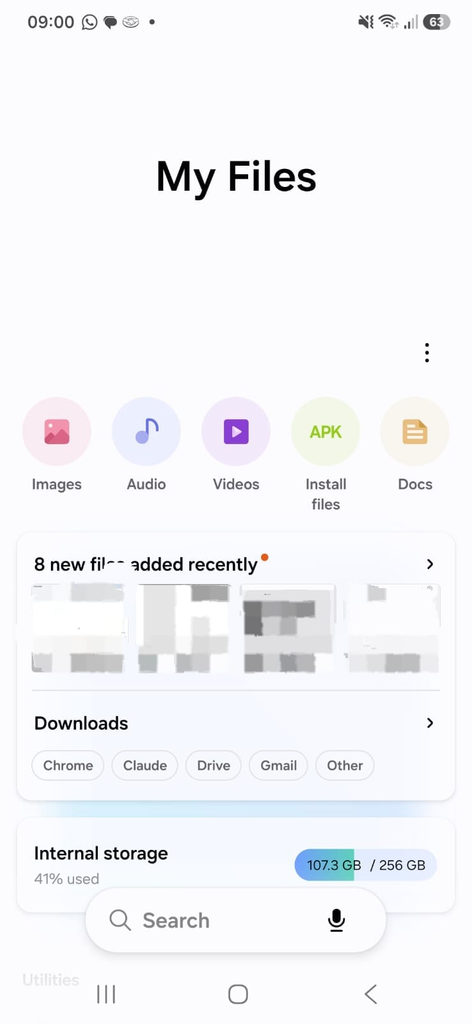
An Android file manager showing files organized inside the Downloads folder.
Create Simple Folders for Important Files
If your phone contains many documents, creating a few folders can make them easier to find.
You could create folders such as:
Documents
Work
Personal
Receipts
Travel
Projects
There is no need to create a separate folder for every individual file.
The purpose is simply to create a predictable place for important information.
For example, receipts could go into one folder while work documents stay in another.
Use Clear File Names
A useful folder structure becomes much more effective when your files also have recognizable names.
Compare:
IMG_20260824_143211.jpg
with:
Car_Insurance_2026.pdf
The second name immediately tells you what the file contains.
When your phone or file manager allows you to rename a document, use a short but descriptive name.
This is particularly useful for PDFs, invoices, receipts, documents, and downloaded files.
Organize Photos Separately
Photos often consume more storage than any other type of personal file.
Instead of keeping everything mixed together, use your photo application to organise pictures into albums or categories when practical.
You might create albums such as:
Family
Travel
Work
Receipts
Important
This does not necessarily move the original photos into separate storage folders, but it makes them much easier to locate.
For example, putting important receipts into a dedicated album can save you from searching through hundreds of photos later.
Keep Screenshots Under Control
Screenshots can accumulate surprisingly quickly.
You might take a screenshot to remember something temporarily and then never use it again.
Every few weeks, open your screenshots folder or album and remove images you no longer need.
Keep important screenshots such as receipts, instructions, reservation details, or documents only when they still serve a purpose.
This simple habit can reduce clutter without affecting your important personal photos.
Review Large Files
Large videos are often responsible for a significant portion of smartphone storage.
Open your file manager or storage settings and look for large files.
Videos, downloaded movies, screen recordings, and duplicated media can occupy hundreds of megabytes or several gigabytes.
Before deleting a large file, check whether you have already backed it up elsewhere.
Do not assume that a large file is unnecessary just because it takes up a lot of space.
Be Careful With WhatsApp and Other Messaging Apps
Messaging applications can save large numbers of images, videos, documents, and audio files.
Over time, these files can occupy a significant amount of storage.
Open your messaging application’s storage settings and review large conversations or media categories when available.
You may discover old videos or documents that you no longer need.
Instead of deleting everything at once, review the files individually when they may contain important information.
Avoid Keeping Multiple Copies of the Same File
Duplicate files can make your storage unnecessarily complicated.
For example, you might have:
Document.pdf
Document (1).pdf
Document-final.pdf
Before deleting duplicates, compare them carefully.
Two files with similar names may contain different versions.
This is especially important for documents that have been edited multiple times.
Keep Important Documents in One Place
Important files are easier to protect when you know exactly where they are.
Consider creating one folder or category for documents such as:
Insurance information
Receipts
Travel documents
Work files
School documents
Personal records
The exact categories depend on how you use your phone.
What matters is being able to find an important document without searching through several unrelated folders.
Use Cloud Storage Carefully
Cloud storage can make files available across multiple devices and can also provide an additional copy of important information.
However, synchronization is not automatically the same as backup.
If a file is deleted and that deletion synchronizes across devices, you may lose the file in more than one location.
For particularly important documents and photos, consider keeping another copy somewhere separate from your phone and primary cloud storage.
Back Up Before Cleaning
One of the most important rules when organizing your phone is to back up important information before performing a major cleanup.
This is especially important when deleting large numbers of photos, videos, or documents.
Verify that important files are available in your backup location before permanently removing them from the phone.
A few extra minutes spent checking a backup can prevent a much bigger problem later.
Do Not Delete Files Just Because They Look Unfamiliar
Some folders and files are created automatically by applications.
You may see names that you do not recognize.
That does not necessarily mean the files are unnecessary.
Avoid deleting application folders or system-related files unless you understand what they are.
When your goal is simply to free up space and improve organization, focus first on personal files such as photos, videos, downloads, duplicates, and documents you no longer need.
Keep Frequently Used Files Easy to Find
Not every important file needs to be buried inside multiple folders.
For files you access regularly, use the features available in your file manager to mark them as favorites or otherwise make them easier to access.
This can be especially useful for documents such as travel reservations, work files, or frequently used PDFs.
A good organization system should save you time rather than create extra steps.
Review Your Phone Regularly
You do not need to spend an entire afternoon organizing your phone.
A short review once or twice a month can prevent clutter from becoming overwhelming.
Check your Downloads folder.
Review large videos.
Delete unnecessary screenshots.
Look for duplicate files.
Remove documents you no longer need.
Move important files into appropriate folders.
Small maintenance sessions are much easier than trying to clean up several years of accumulated files at once.
A Simple File Organization System
A straightforward system works well for most people.
You could keep important documents organized into a few broad categories:
Documents
Work
Personal
Receipts
Projects
Then use descriptive file names and review your Downloads, screenshots, and large files regularly.
You do not need a perfect filing system.
You need one that you can understand and maintain without thinking too much about it.
Protect Your Important Files
Organization is only part of the solution.
Important files should also be protected from accidental deletion, device damage, theft, or hardware problems.
Keep copies of valuable photos and documents somewhere other than the phone itself.
For example, you might use cloud storage together with an external computer or another storage device.
The more important the file is, the less you should depend on a single copy.
Make File Organization a Habit
The easiest way to keep your phone organized is to deal with files when you create or download them.
When you download a document, decide whether you actually need it.
When you take a screenshot, remove it later if it was only temporary.
When you receive an important file through a messaging app, move or save it somewhere easier to find.
When you finish a project, clean up the files associated with it.
These small actions prevent clutter from growing out of control.
A well-organized phone does not need dozens of folders or a complicated system. The most useful approach is to keep important files in predictable locations, use clear names, remove unnecessary clutter regularly, and maintain backups of information you cannot afford to lose.
The goal is simple: when you need an important file, you should be able to find it quickly without wondering where you saved it.