
Email is one of the most useful ways to communicate online, but it is also one of the most common places where scams begin.
A suspicious email may look like it came from a bank, online store, delivery company, social media platform, or even someone you know. It may contain an urgent message asking you to click a link, confirm information, open an attachment, or sign in to an account.
Some fraudulent emails are easy to recognize. Others are carefully designed to look legitimate.
The good news is that you do not need advanced technical knowledge to identify many suspicious messages. By slowing down and checking a few details before clicking anything, you can avoid a large number of phishing attempts and other email scams.
Do Not Click Immediately
The most important habit is simple: do not click a link just because an email tells you to.
Scammers often create a sense of urgency. The message might claim that your account will be suspended, that a payment failed, that a package could not be delivered, or that you need to confirm your identity immediately.
The purpose is to make you react before you have time to think.
Instead of clicking the button straight away, stop and examine the message.
Ask yourself whether you were expecting the email and whether the situation described actually makes sense.
A few extra seconds can prevent a much bigger problem.
Check Who Sent the Email
Start by looking carefully at the sender.
The name displayed in your inbox is not enough. Scammers can use a familiar company name as the visible sender name while using a completely different email address.
For example, an email might appear to come from a well-known company, but the actual address could contain strange words, unusual characters, or a domain unrelated to that company.
Open the sender details when necessary and inspect the complete email address.
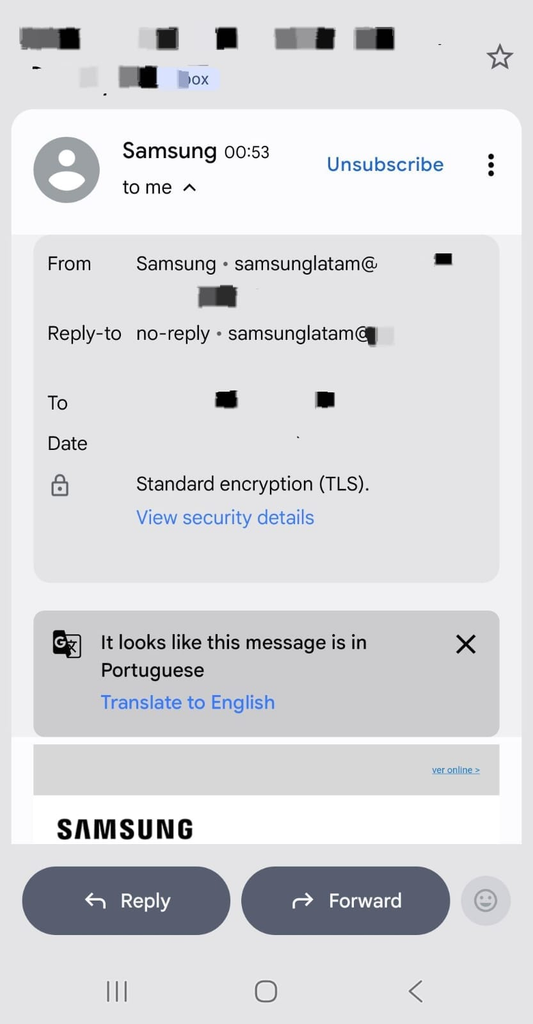
An email message showing the sender information before the recipient opens any links or attachments.
A legitimate company will normally use an email address associated with its official domain. However, even a professional-looking address should not be treated as automatic proof that the message is genuine.
Look Carefully at the Message
After checking the sender, read the entire message carefully.
Look for unusual wording, unexpected requests, or information that does not fit your situation.
Some warning signs include:
- A request for your password
- A demand for payment
- A request for a security code
- An unexpected account warning
- A claim that you won a prize
- A request to confirm personal information
- A message about a service you do not use
You should be especially careful when the message asks you to perform an important action immediately.
Watch for Urgent Language
Scammers frequently use urgency to make people act without checking the details.
A message might say that you have only a few hours to solve a problem or that your account will be permanently blocked.
Legitimate businesses can certainly send urgent notifications, but urgency alone should not convince you to click a link.
Take a moment to verify the situation independently.
For example, rather than using the link inside an unexpected email, open the company’s official website or application yourself and check whether there is actually a problem with your account.
This is one of the safest ways to separate a real notification from a fake one.
Check Links Before Opening Them
Links are one of the most important things to inspect in a suspicious email.
On a computer, you can often move your mouse over a link without clicking it. The actual web address may then appear in the browser or at the bottom of the window.
On a phone, you may be able to press and hold the link to preview its destination, depending on your email application.
Look at the domain carefully.
A scammer might create a website address that contains the name of a legitimate company while using a completely different domain.
For example, a fraudulent address might contain extra words, strange combinations of letters, or a spelling that is almost correct.
Do not assume that a familiar-looking word inside the address makes the website legitimate.
Be Careful With Login Requests
A common phishing technique is an email asking you to sign in to an account.
The email may contain a button such as:
Sign in
Verify your account
Confirm your identity
Restore access
The page may look almost identical to the real login page.
This is why you should be cautious about logging in through unexpected email links.
Instead, open the service’s official website or app yourself and sign in there.
If there is genuinely a problem with your account, you will usually be able to see it after signing in normally.
Check for Unexpected Attachments
Attachments can also be used in scams.
Be cautious when you receive an unexpected file, especially if the sender asks you to open it immediately.
Common warning signs include:
- Unexpected invoices
- Unknown documents
- Compressed files you were not expecting
- Files claiming to be account statements
- Attachments from unfamiliar senders
Even if the filename looks professional, that does not guarantee that the file is safe.
Do not open unexpected attachments simply because the message appears urgent.
Do Not Trust Familiar Logos
Scammers often copy company logos, colours, email layouts, and wording from real businesses.
A message can therefore look extremely professional while still being fraudulent.
The visual appearance of an email is not enough to establish whether it is legitimate.
Pay more attention to the sender address, links, request, timing, and context.
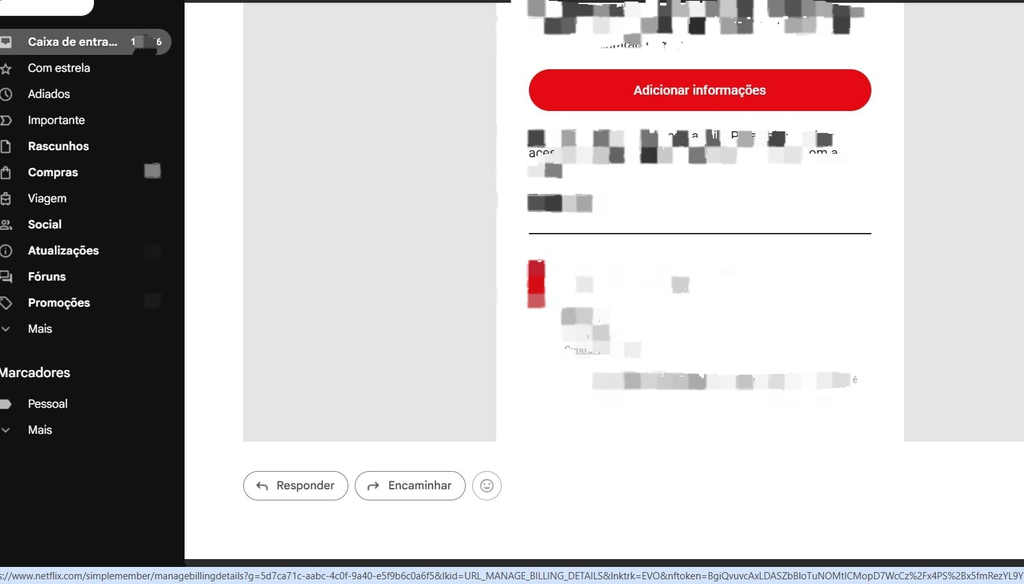
An example of an email interface where the message content and sender details can be examined before responding.
Think About Whether You Were Expecting the Message
Context is one of your best tools.
Suppose you receive an email saying that your package could not be delivered, but you have not ordered anything recently.
That does not automatically prove that the email is fake, but it is a good reason to be cautious.
The same applies to messages about bank accounts, subscriptions, invoices, password resets, and prizes that you never requested.
Ask yourself:
Why would this company be contacting me?
If you cannot think of a reasonable answer, do not rush to interact with the message.
Be Suspicious of Requests for Security Codes
A particularly serious warning sign is a request for a one-time security code.
A legitimate service may send you a code when you are signing in, but you should not normally give that code to another person simply because an email asks for it.
Scammers may use social engineering to convince victims that they need to provide a code to verify an account or cancel a suspicious transaction.
Never share verification codes unless you are certain about why they are being used and where you are entering them.
Check the Greeting
The way an email addresses you can sometimes provide useful clues.
A legitimate company may know your name, account information, or other details depending on the service.
Some scams use generic greetings such as:
Dear Customer
Dear User
Dear Member
A generic greeting does not prove that a message is fraudulent. Large companies sometimes send generic notifications.
However, when combined with suspicious links, urgent requests, or unusual wording, it can become another warning sign.
Look for Strange Grammar or Formatting
Poor grammar was once one of the easiest ways to recognize phishing emails.
Today, that is no longer always reliable.
Scammers can use professional-looking templates and writing tools to create convincing messages.
Still, strange formatting, inconsistent fonts, awkward sentences, unusual punctuation, or sentences that feel unnatural can be useful clues.
Do not judge an email based on grammar alone. Consider the entire message.
Be Careful Even When the Email Looks Professional
A well-designed email can still be malicious.
Some scams copy the exact colours, logos, and general layout of legitimate companies.
This is why the most important checks are not visual.
Instead, focus on:
Who sent it?
Why did you receive it?
What does the link actually lead to?
Is the requested action reasonable?
Can you verify the message through another method?
These questions are much more useful than simply asking whether the email “looks real.”
Verify Through the Official Website or App
When you receive an unexpected security or account notification, verify it independently.
For example, if an email says your account has a problem, do not use the button inside the email.
Instead:
Open the official app manually.
Or type the company’s known website address into your browser.
Then sign in normally and check for notifications or account warnings.
This method removes the suspicious email link from the process.
A user accessing an account directly through the official website instead of following an unexpected email link.
What to Do With a Suspicious Email
When an email looks suspicious, you do not need to investigate it by clicking links.
The safest approach is to leave the links and attachments alone.
Depending on your email service, you may have options to report the message as spam or phishing.
Reporting suspicious messages can help improve filtering and keep similar emails out of your inbox in the future.
After reporting the message, you can delete it.
What If You Already Clicked?
Accidentally clicking a suspicious link does not always mean that your account has been compromised.
What matters is what happened afterward.
If you clicked the link but immediately closed the page and did not enter information or download anything, the situation may be less serious.
However, if you entered a password, payment information, or another sensitive detail, take action quickly.
Change the affected password from the official website or app, and review recent account activity.
If you entered financial information, contact the relevant financial institution through its official contact method.
The important thing is to act through trusted channels rather than returning to the suspicious email.
Do Not Reply to Suspicious Messages
Replying to a suspicious email can confirm that your email address is active.
It can also encourage the sender to continue contacting you.
There is rarely a good reason to respond directly to a suspicious message.
Use your email provider’s reporting tools instead when appropriate.
Create a Habit of Checking Before Clicking
The best defence against phishing is not memorising every possible scam.
It is developing a consistent habit.
Whenever an unexpected email asks you to click, sign in, pay, download, or provide information, pause before doing anything.
Check the sender.
Read the message carefully.
Inspect the destination of links.
Think about whether you were expecting the message.
Then verify important requests through the official website or application.
These small habits make it much harder for a scammer to rush you into making a mistake.
A Simple Email Safety Checklist
Before clicking a link in an unexpected email, ask yourself:
Do I know who sent this?
Was I expecting this message?
Is the request reasonable?
Does the link lead to the correct website?
Is the message trying to pressure me?
Can I verify this directly through the official app or website?
When there is any doubt, do not click.
A legitimate company can normally be contacted or accessed through its official website or application without relying on an unexpected email link.
The safest response to a suspicious email is often the simplest one: stop, verify, and only then decide what to do.